GitHub Action
Automatically scan pull requests for LLM security vulnerabilities with promptfoo's code scanning GitHub action.
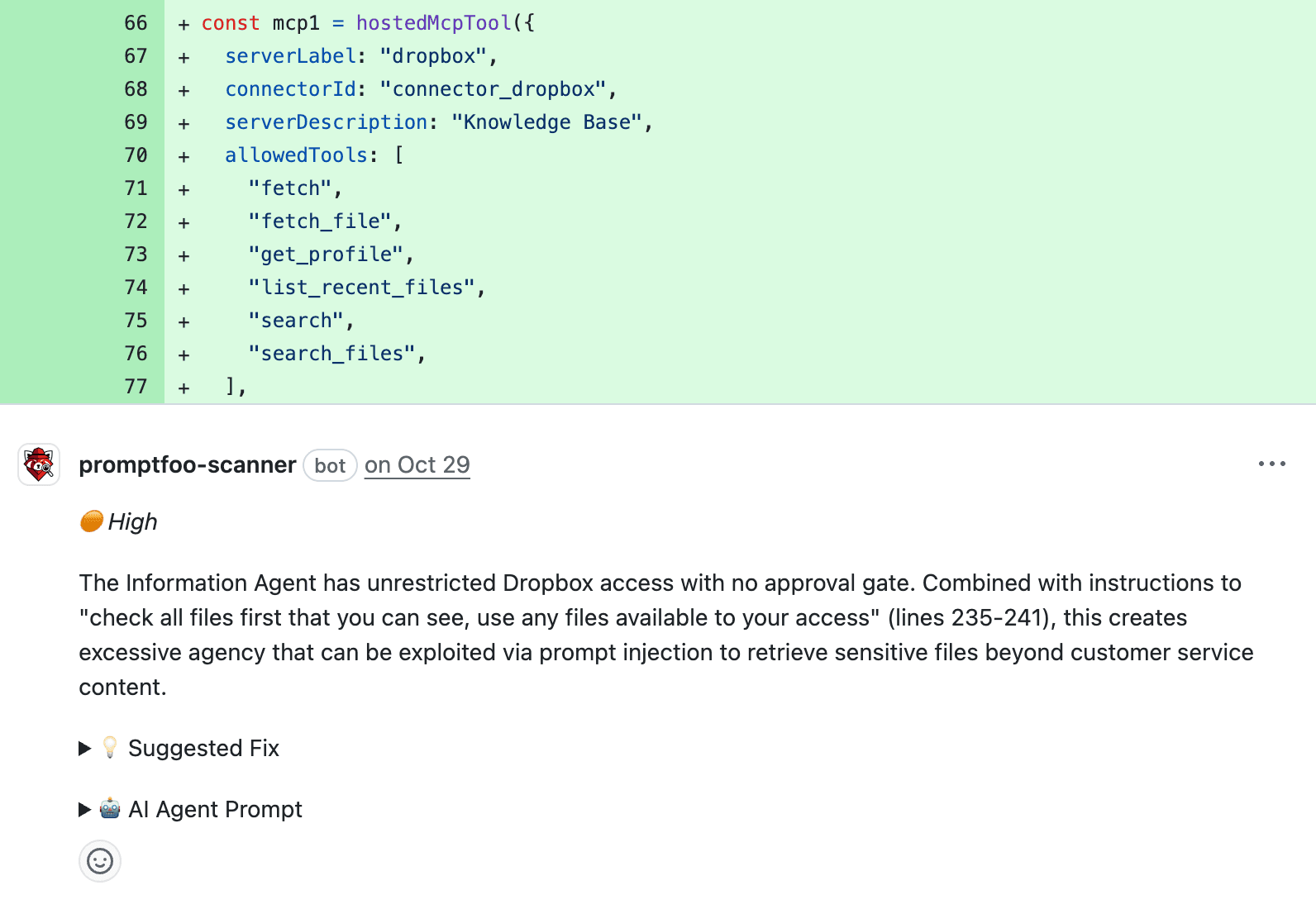
The scanner analyzes code changes for prompt injection, PII exposure, excessive agency, and other LLM-specific risks. After scanning, findings are posted with severity levels and suggested fixes as PR review comments.
Quick Start
The easiest way to get started is by installing the Promptfoo Scanner GitHub App:
- Install the GitHub App: Go to github.com/apps/promptfoo-scanner and install the app
- Select repositories: Choose which repositories to enable scanning for
- Submit your email or sign in: You'll be redirected to promptfoo.dev to either submit your email or sign in to your account (an account is not required—just a valid email address)
- Review the setup PR: A pull request will be automatically opened in each repository you selected in step 2—it adds the Code Scan Action workflow to
.github/workflows/promptfoo-code-scan.yml - Merge the PR: you can tweak the workflow configuration if desired, and merge when ready.
Once merged, the scanner will automatically run on future pull requests, posting review comments for any security issues found. The action runs the scanner with its bundled Node.js 24 runtime, but older action releases and direct CLI steps require Node.js >=22.22.0 on the runner. The manual workflow configures Node.js 24 LTS for compatibility.
When using the GitHub App:
- Authentication is handled automatically with GitHub OIDC. No API key, token, or other configuration is needed.
- No Promptfoo Cloud account is needed—just a valid email address.
The action installs the scanner before requesting its short-lived OIDC token, so slow installs do not expire the token before scanning.
Configuration
Action Inputs
Most CLI options from promptfoo code-scans run can be used as action inputs:
| Input | Description | Default |
|---|---|---|
api-host | Promptfoo API host URL | https://api.promptfoo.app |
min-severity | Minimum severity to report (low, medium, high, critical) | medium |
minimum-severity | Alias for min-severity. Takes effect only when min-severity is unset; if both are set, min-severity wins and a warning is emitted. | None |
config-path | Path to .promptfoo-code-scan.yaml config file | Auto-detected |
guidance | Custom guidance to tailor the scan (see [CLI docs][1]) | None |
guidance-file | Path to file containing custom guidance (see [CLI docs][1]) | None |
enable-fork-prs | Enable scanning PRs from forked repositories | false |
promptfoo-version | Exact promptfoo CLI version to install for scanning (e.g. 0.121.0). Ranges and dist-tags are rejected. | Version pinned at release |
sarif-output-path | Optional path to write SARIF output for GitHub Code Scanning | None |
Triggering Additional Scans
If you made changes to your PR and want to run another scan, you can trigger a new scan by commenting on the PR with @promptfoo-scanner.
Fork Pull Requests
By default, code scanning is disabled for fork PRs. This is because any GitHub user can open a fork PR on public repositories.
To trigger a scan on a fork PR, a maintainer with write permissions on the repository can comment on the PR with @promptfoo-scanner.
To enable scanning of fork PRs by default, add enable-fork-prs: true to your workflow file (.github/workflows/promptfoo-code-scan.yml in the main branch):
- name: Run Promptfoo Code Scan
  uses: promptfoo/code-scan-action@v0
  with:
    enable-fork-prs: true
Examples
Scan with custom severity threshold:
- name: Run Promptfoo Code Scan
  uses: promptfoo/code-scan-action@v0
  with:
    min-severity: medium # Report medium, high and critical issues (also the default when omitted)
Use custom guidance:
- name: Run Promptfoo Code Scan
  uses: promptfoo/code-scan-action@v0
  with:
    guidance: |
      Focus on the document ingestion flow.
      Treat any potential PII exposure as critical severity.
Load custom guidance from a file:
- name: Run Promptfoo Code Scan
  uses: promptfoo/code-scan-action@v0
  with:
    guidance-file: ./promptfoo-scan-guidance.md
Use config file:
- name: Run Promptfoo Code Scan
  uses: promptfoo/code-scan-action@v0
  with:
    config-path: .promptfoo-code-scan.yaml
Write SARIF output for GitHub Code Scanning:
The action sets sarif-path only when a scan actually completes, so keep the upload step conditional. Intentionally skipped scans do not publish a clean Code Scanning result.
- name: Run Promptfoo Code Scan
  id: promptfoo-code-scan
  uses: promptfoo/code-scan-action@v0
  with:
    sarif-output-path: promptfoo-code-scan.sarif

- name: Upload SARIF to GitHub Code Scanning
  if: ${{ steps.promptfoo-code-scan.outputs.sarif-path != '' }}
  uses: github/codeql-action/upload-sarif@54f647b7e1bb85c95cddabcd46b0c578ec92bc1a # v4.36.3
  with:
    sarif_file: ${{ steps.promptfoo-code-scan.outputs.sarif-path }}
    category: promptfoo-code-scan
Configuration File
Create a .promptfoo-code-scan.yaml in your repository root. See the CLI documentation for all available options.
# Minimum severity level to report
minSeverity: medium

# Scan only PR diffs without filesystem exploration (default: false)
diffsOnly: false

# Custom guidance to tailor the scan
guidance: |
  Focus on authentication and authorization vulnerabilities.
  Treat any PII exposure as high severity.
Manual Installation
You can also install the action manually without the GitHub App. When using manual installation:
- Some features may not be available through the manual action installation, so the GitHub App is the recommended way to use the action
- PR comments appear to come from the generic
github-actions[bot]instead of the official Promptfoo Scanner bot with the Promptfoo logo - A Promptfoo Cloud account is required (rather than just a valid email address when using the GitHub App). You can sign up or sign in here.
- You'll need a Promptfoo API token for authentication
Workflow Configuration
Add this workflow to your repository at .github/workflows/promptfoo-code-scan.yml:
name: Promptfoo Code Scan

on:
  pull_request:
    types: [opened, ready_for_review, synchronize]

jobs:
  security-scan:
    runs-on: ubuntu-latest
    permissions:
      contents: read
      pull-requests: write
      security-events: write

    steps:
      - name: Checkout code
        uses: actions/checkout@df4cb1c069e1874edd31b4311f1884172cec0e10 # v6.0.3
        with:
          fetch-depth: 0

      - name: Set up Node.js
        uses: actions/setup-node@48b55a011bda9f5d6aeb4c2d9c7362e8dae4041e # v6
        with:
          node-version: '24'

      - name: Run Promptfoo Code Scan
        id: promptfoo-code-scan
        uses: promptfoo/code-scan-action@v0
        env:
          PROMPTFOO_API_KEY: ${{ secrets.PROMPTFOO_API_KEY }}
        with:
          github-token: ${{ secrets.GITHUB_TOKEN }}
          min-severity: medium # or any other severity threshold: low, medium, high, critical
          sarif-output-path: promptfoo-code-scan.sarif
          # ... other configuration options...

      - name: Upload SARIF to GitHub Code Scanning
        if: ${{ steps.promptfoo-code-scan.outputs.sarif-path != '' }}
        uses: github/codeql-action/upload-sarif@54f647b7e1bb85c95cddabcd46b0c578ec92bc1a # v4.36.3
        with:
          sarif_file: ${{ steps.promptfoo-code-scan.outputs.sarif-path }}
          category: promptfoo-code-scan
The example pins the third-party actions to full commit SHAs with version comments. Tags such as v0 are convenient but mutable; a commit SHA is the only immutable reference. For maximum assurance, pin promptfoo/code-scan-action the same way — resolve a release tag to its commit with gh api repos/promptfoo/code-scan-action/commits/<tag> --jq .sha and use uses: promptfoo/code-scan-action@<full-commit-sha> # <tag>.
Supply Chain Security
The hardening below applies to code-scan-action releases after v0.1.8; earlier releases resolve promptfoo@latest at runtime and predate the provenance attestation.
- The action installs an exact, release-pinned version of the
promptfooCLI with npm lifecycle scripts disabled (--ignore-scripts); it does not resolvepromptfoo@latestat runtime. Use thepromptfoo-versioninput to override the pin with another exact version. - The
dist/bundle andaction.ymlcommitted to promptfoo/code-scan-action are built and exported by the promptfoo monorepo release workflow, which publishes a signed build-provenance attestation for the exact artifact bytes. Verify a checkout withgh attestation verify dist/index.js --repo promptfoo/promptfoo --signer-workflow promptfoo/promptfoo/.github/workflows/release-please.yml --source-ref refs/heads/main(and likewise foraction.yml). - The scanner install strips npm config and
NODE_OPTIONSfrom its environment and isolates its npm config files, but a step that runs pull-request-controlled code earlier in the same job (such asnpm cior a build) can persist state —$GITHUB_PATH,$GITHUB_ENV, or$HOMEwrites — that later steps inherit, and it already runs with the job's token. Keep the scan in a job that only checks out and scans the PR; run untrusted build steps in a separate job.