Sandboxed Evaluations of LLM-Generated Code
You're using LLMs to generate code snippets, functions, or even entire programs. Blindly trusting and executing this generated code in our production environments - or even in development environments - can be a severe security risk.
This is where sandboxed evaluations come in. By running LLM-generated code in a controlled, isolated environment, we can:
- Safely assess the code correctness.
- Benchmark different LLMs or prompts to find which produce the most reliable code.
- Catch potential errors, infinite loops, or resource-intensive operations before they impact the host system.
In this tutorial, we'll use promptfoo to set up an automated pipeline for generating Python code with an LLM, executing it in a secure sandbox using epicbox, and evaluating the results.
Prerequisites
Make sure you have the following installed:
- Node.js and npm
- Python 3.10+
- Docker
- promptfoo (
npm install -g promptfoo)
On Windows, run this tutorial in WSL 2 with Docker Desktop’s WSL integration enabled. Install Node.js and Python inside WSL; native Windows Python is not supported by Epicbox.
Create a virtual environment in your project directory and install the example's Python requirements.
python3 -m venv .venv
source .venv/bin/activate
python -m pip install -r https://raw.githubusercontent.com/promptfoo/promptfoo/main/examples/integration-docker/code-generation-sandbox/requirements.txt
Keep the virtual environment active in the same shell when running the evaluation.
These use the official Epicbox 1.1.1 GitHub release, verified by a SHA-256 hash, and retain transport security minimums. Epicbox 1.1.0 on PyPI is incompatible with urllib3 2.
Pull the Docker image you want to use so it is available locally. In this tutorial, we'll use a generic Python image, but you can use a custom one if you want:
docker pull python:3.9-alpine
Configuration
Create the promptfoo configuration file
Create a file named promptfooconfig.yaml:
prompts: file://code_generation_prompt.txt

providers:
  - openai:gpt-5
  - ollama:chat:llama4:scout

tests:
  - vars:
      problem: 'Write a Python function to calculate the factorial of a number'
      function_name: 'factorial'
      test_input: '5'
      expected_output: '120'
  - vars:
      problem: 'Write a Python function to check if a string is a palindrome'
      function_name: 'is_palindrome'
      test_input: "'racecar'"
      expected_output: 'True'
  - vars:
      problem: 'Write a Python function to find the largest element in a list'
      function_name: 'find_largest'
      test_input: '[1, 5, 3, 9, 2]'
      expected_output: '9'

defaultTest:
  assert:
    - type: python
      value: file://validate_and_run_code.py
This configuration does several important things:
- It tells promptfoo to use our prompt template
- We're testing GPT-5 and Llama 4 (you can replace this with a provider of your choice. Promptfoo supports both local and commercial providers).
- It defines coding problems. For each problem, it specifies the function name, a test input, and the expected output.
- It sets up a Python-based assertion that will run for each test case, validating the generated code.
Create the prompt template
Create a file named code_generation_prompt.txt with the following content:
You are a Python code generator. Write a Python function to solve the following problem:

{{problem}}

Use the following function name: {{function_name}}

Only provide the function code, without any explanations or additional text. Wrap your code in triple backticks.
This prompt will be sent to the LLM, with {{variables}} substituted accordingly (this prompt is a jinja-compatible template).
Set up the Python assertion script
Create a file named validate_and_run_code.py. This will be a Python assertion that dynamically grades each coding problem by running it in a Docker container using epicbox.
import epicbox
import re

# Replace with your preferred Docker image
DOCKER_IMAGE = 'python:3.9-alpine'

def get_assert(output, context):
    # Extract the Python function from the LLM output
    function_match = re.search(r'```python\s*\n(def\s+.*?)\n```', output, re.DOTALL)
    if not function_match:
        return {'pass': False, 'score': 0, 'reason': 'No function definition found'}

    function_code = function_match.group(1)

    epicbox.configure(
        profiles=[
            epicbox.Profile('python', DOCKER_IMAGE)
        ]
    )

    function_name = context['vars']['function_name']
    test_input = context['vars']['test_input']
    expected_output = context['vars']['expected_output']

    # Create a Python script to call the LLM-written function
    test_code = f"""
{function_code}

# Test the function
result = {function_name}({test_input})
print(result)
"""

    files = [{'name': 'main.py', 'content': test_code.encode('utf-8')}]
    limits = {'cputime': 1, 'memory': 64}

    # Run it
    result = epicbox.run('python', 'python main.py', files=files, limits=limits)

    # Check the result
    if result['exit_code'] != 0:
        return {'pass': False, 'score': 0, 'reason': f"Execution error: {result['stderr'].decode('utf-8')}"}

    actual_output = result['stdout'].decode('utf-8').strip()
    if actual_output == str(expected_output):
        return {'pass': True, 'score': 1, 'reason': f'Correct output: got {expected_output}'}
    else:
        return {'pass': False, 'score': 0, 'reason': f"Incorrect output. Expected: {expected_output}, Got: {actual_output}"}
Running the Evaluation
Execute the following command in your terminal:
promptfoo eval
This command will:
- Generate Python code for each problem using an LLM
- Extract the generated code
- Run it in the Docker sandbox environment
- Determine whether the output is correct or not
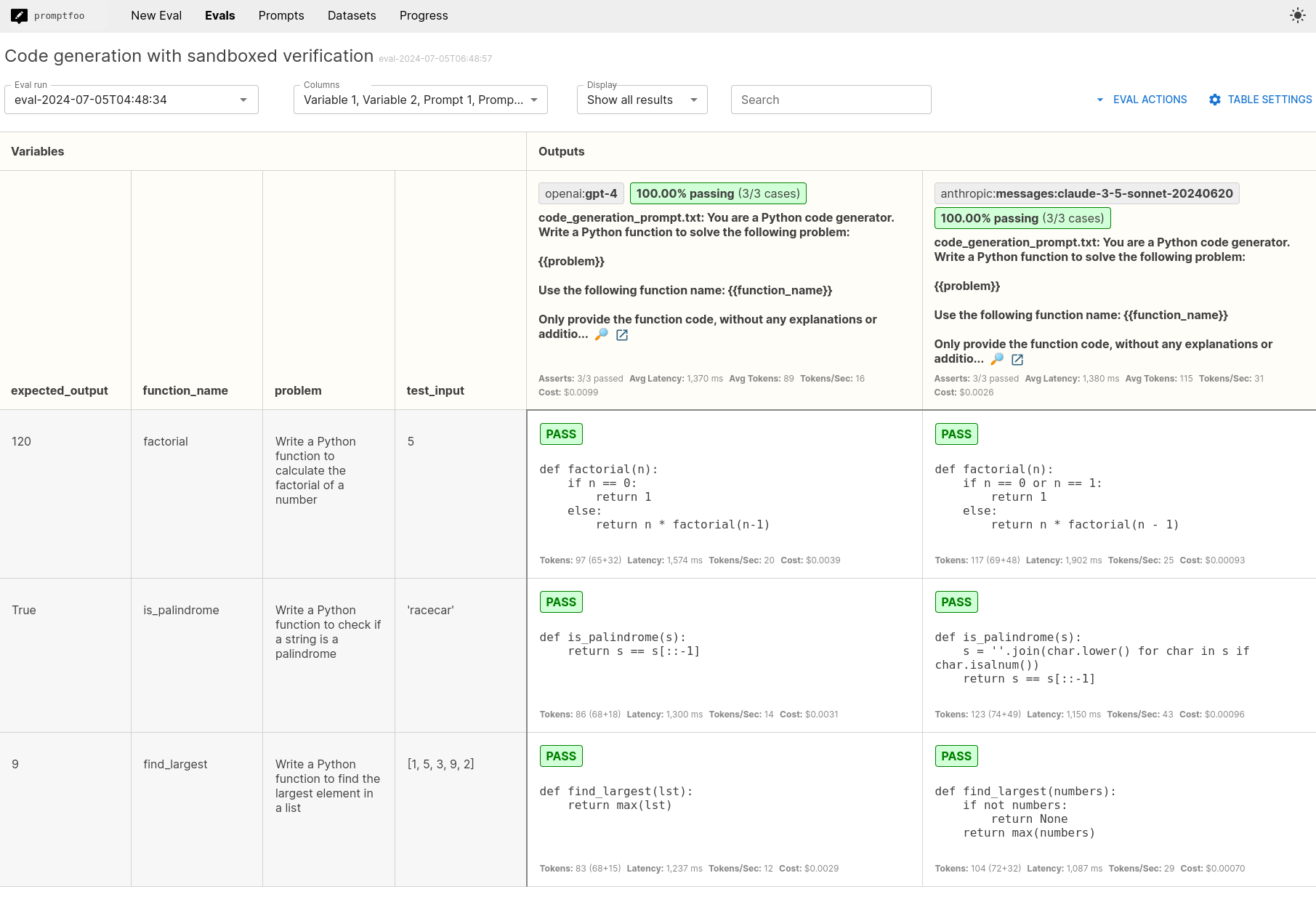
Analyzing Results
After running the evaluation, open the web viewer:
promptfoo view
This will display a summary of the results. You can analyze:
- Overall pass rate of the generated code
- Specific test cases where the LLM succeeded or failed
- Error messages or incorrect outputs for failed tests
What's next
To further explore promptfoo's capabilities, consider:
- Testing different LLM providers
- Modify your prompt
- Expanding the range of coding problems and test cases
For more information, refer to the official guide. You can also explore continuous integration and integrations with other tools.